Domains, Hosting and Email forEducation & Training
Help learners and families understand the program, the schedule, and the next step.
For independent schools, tutors, training providers, learning centres, and continuing-education programs
Education websites must serve learners, families, and staff without burying essential information. Programs, eligibility, schedules, fees, accessibility, and contact paths should be written in plain language and kept current.
Use the matching Education & Training workbook to shape your pages, and watch the contact video if you would like help from SaaSTech.
SAASTECH SUPPORT VIDEO
How to contact SaaSTech Servers
Need help choosing your next step? This short video explains how to contact SaaSTech Servers. Use the page plan and downloadable guide below to plan your website.
A website-planning guide in editable Word and print-ready PDF, with an example page plan, sample wording and space to draft your own content. Adapt the fictional example and confirm the details for your business.
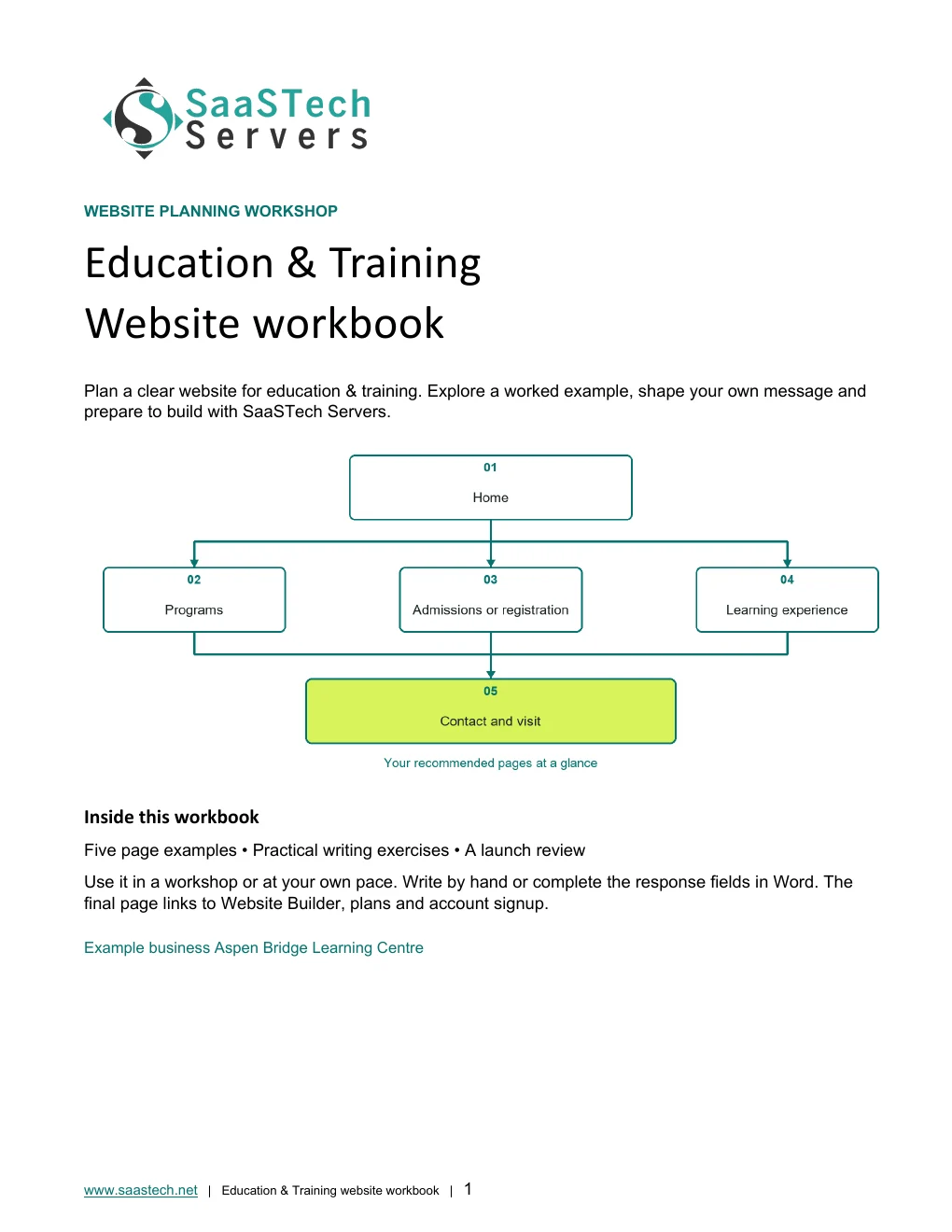
Start with this compact structure and add pages only when they answer a distinct visitor question.
01 · HomeIdentify who the program serves, the learning outcome, location or delivery format, and the main enquiry action. Privacy-cropped excerpt; browser/editor chrome removed.02 · ProgramsGive every important course or program its own clear description, audience, schedule, prerequisites, and cost. Privacy-cropped excerpt; browser/editor chrome removed.03 · Admissions or registrationExplain the decision process, deadlines, required information, fees, and what happens after an enquiry. Privacy-cropped excerpt; browser/editor chrome removed.04 · Learning experienceShow instructors, facilities, teaching approach, accessibility, and appropriate examples of learner work. Privacy-cropped excerpt; browser/editor chrome removed.05 · Contact and visitProvide the correct office contact, hours, location, virtual options, and a tour or consultation path. Privacy-cropped excerpt; browser/editor chrome removed.
Compare plans
Choose your Website Builder plan.
Compare current Canadian starting prices and popular features. Final promotions, taxes, currency, eligibility and terms are confirmed in the secure shop.
Suggested for Education & Training: Business Plus. It supports program pages, consultation or tour appointments, news updates, and consistent communication without requiring a custom learning platform.
Best for Starter sites
Personal
C$8.99 / month
Professionally designed themes
Hosting, SSL and blog
Best for Business presence
Business
C$13.99 / month
Everything in Personal
PayPal and SEO
Suggested for this industryBest for Service businesses
Business Plus
C$20.99 / month
Social integration
Online appointments
Best for Selling online
Online Store
C$36.99 / month
Shopping cart and payments
Shipping and inventory
See what you can build
Explore the editor themes behind the Education & Training site.
These real Website Builder screens follow Aspen Bridge Learning Centre from the first setup prompts to five finished pages. See how coordinated education photography, a clear programme journey, professionally designed themes, and flexible light-to-dark colour treatments shape one complete site.
First setup
See how the Education & Training starter site begins.
Follow the real setup sequence from an industry suggestion to a generated first draft.
Choose the education categoryTyping the business type reveals relevant suggestions before the starter site is generated.Add the learning centre nameAspen Bridge Learning Centre gives the generated site a clear, professional identity from the start.Confirm public contact detailsThe setup flow gathers the location and contact information prospective learners will need.Describe the programmesA focused description gives the first draft its audience, delivery options, and practical learning direction.Building your siteWebsite Builder turns the setup choices into a starting design ready for thoughtful editing.Begin with a complete first draftThe generated site is ready for a coordinated logo, industry colour, programme pages, and message-matched photography.
Editor highlights
Turn the starting point into a complete learning-centre site.
Edit the finished home pageThe visual editor keeps the hero, logo, navigation, content, and primary action visible while the page is refined.Organize the learner journeyHome, Programs, Registration, Learning Experience, and Contact & Visit stay together in one clear page structure.Add useful page sectionsThe section library offers flexible layouts, contact tools, media, scheduling, galleries, and other content as the site grows.
See what you can build
Themes and Paint your site
Open the preview to explore the captured themes, logo variations and paint settings in the image viewer.
Selected colours
Compare Aspen Bridge across professionally designed themes.
Chosen-colour themes 1Aspen Bridge compared across professionally designed themes while keeping its deep blue, gold, education photography, and coordinated logo.Chosen-colour themes 2Aspen Bridge compared across professionally designed themes while keeping its deep blue, gold, education photography, and coordinated logo.Chosen-colour themes 3Aspen Bridge compared across professionally designed themes while keeping its deep blue, gold, education photography, and coordinated logo.Chosen-colour themes 4Aspen Bridge compared across professionally designed themes while keeping its deep blue, gold, education photography, and coordinated logo.Chosen-colour themes 5Aspen Bridge compared across professionally designed themes while keeping its deep blue, gold, education photography, and coordinated logo.Chosen-colour themes 6Aspen Bridge compared across professionally designed themes while keeping its deep blue, gold, education photography, and coordinated logo.Chosen-colour themes 7Aspen Bridge compared across professionally designed themes while keeping its deep blue, gold, education photography, and coordinated logo.Chosen-colour themes 8Aspen Bridge compared across professionally designed themes while keeping its deep blue, gold, education photography, and coordinated logo.
Default styles
See the same Education & Training content with every theme's original styling.
Default-style themes 1The same education content shown with each theme's original colours, typography, navigation, and button treatment.Default-style themes 2The same education content shown with each theme's original colours, typography, navigation, and button treatment.Default-style themes 3The same education content shown with each theme's original colours, typography, navigation, and button treatment.Default-style themes 4The same education content shown with each theme's original colours, typography, navigation, and button treatment.Default-style themes 5The same education content shown with each theme's original colours, typography, navigation, and button treatment.Default-style themes 6The same education content shown with each theme's original colours, typography, navigation, and button treatment.Default-style themes 7The same education content shown with each theme's original colours, typography, navigation, and button treatment.Default-style themes 8The same education content shown with each theme's original colours, typography, navigation, and button treatment.
Paint your site
Choose the right balance of brand colour and contrast.
Each option changes the visual treatment while preserving the same logo, photography, pages, and message.
Paint your site: LightAspen Bridge shown in the light paint setting without changing its pages, images, or content.Paint your site: Light balancedAspen Bridge shown in the light balanced paint setting without changing its pages, images, or content.Paint your site: Soft colourAspen Bridge shown in the soft colour paint setting without changing its pages, images, or content.Paint your site: ColourfulAspen Bridge shown in the colourful paint setting without changing its pages, images, or content.Paint your site: Rich colourAspen Bridge shown in the rich colour paint setting without changing its pages, images, or content.Paint your site: Deep colourAspen Bridge shown in the deep colour paint setting without changing its pages, images, or content.Paint your site: DarkAspen Bridge shown in the dark paint setting without changing its pages, images, or content.
Earn confidence
Proof customers can evaluate.
Verifiable instructor qualifications
Current program dates and fees
Clear learner-safety and privacy practices
Accessible contact and accommodation information
Be discoverable
Help the right customer find you.
Create a focused page for each program people search for by name.
Publish important dates as accessible page content, not only inside images or PDFs.
Use learner stories and photographs only with appropriate consent.
Find your domain
It all starts with a name.
Try a .ca, or leave out the ending and we’ll help you find one that fits. The live search confirms current availability and pricing.
Explore country-code and regional domain endings with dedicated SaaSTech help articles. Registration rules and availability vary by registry and are confirmed in the secure storefront. Select an ending to open its specific help article in a new tab.
Compare current Canadian starting prices and popular features. Final promotions, taxes, currency, eligibility and terms are confirmed in the secure shop.
Suggested for Education & Training: Business Professional. The guide uses Office apps, business email, calendars and organized documents together. Choose a lighter plan for roles that only need email or browser-based tools; confirm the features and number of users needed before ordering.
Best for Professional email
Email Essentials
C$8.99 / month
10 GB mailbox
Sync and shared calendars
Best for Larger mailbox
Email Plus
C$9.99 / month
50 GB mailbox
Sync and shared calendars
Best for Cloud teamwork
Online Business Essentials
C$15.99 / month
Office web apps and 1 TB
Meetings plus 50 GB email
Suggested for this industryBest for Full Office apps
Business Professional
C$22.99 / month
Apps on up to 5 devices and 1 TB
Meetings plus 50 GB email
Grow intentionally
Advanced options when the business is ready.
These are selective next steps—not requirements for launching the website.
Download templates branded for Aspen Bridge Learning. Complete the fields in Word or the input cells in Excel, or print the forms and planners for handwriting. Website workbooks also include a print-ready PDF. Adapt the example branding and details for your own business.
SaaSTech website planning workbook · Page 1SaaSTech Servers · Word document preview. Download the editable file below.
A website-planning guide in editable Word and print-ready PDF, with an example page plan, sample wording and space to draft your own content. Adapt the fictional example and confirm the details for your business.
SaaSTech example templates, not official Microsoft templates. Keep confidential records in your approved private systems. These files do not connect to Website Builder or submit information.
Put the services to work
Small systems that make a real business easier to choose.
These examples connect the technology to everyday customer and team needs in education & training.
01Domain
Give every program one trusted home
Use a clear domain on course materials, community listings, instructor email, registration messages, and learner resources.
02Website
Answer the questions before registration
Publish program outcomes, audience, prerequisites, schedules, fees, accessibility, and the exact next step on each program page.
03Microsoft 365
Coordinate instructors and enquiries
Use role-based mailboxes, shared calendars, meetings, and managed documents while learner records stay in approved education systems.
Before going live
Launch like a customer is already waiting.
Explore industries⌃AaDisplay
Text size
Appearance
Get Your Education & Training Business Online | SaaSTech Servers