Make safety, qualifications, and service coverage easy to verify.
For licensed electricians and residential, commercial, or industrial electrical contractors
An electrical-services website earns enquiries by communicating competence and boundaries. Avoid vague safety claims; show qualifications, the types of work accepted, and a clear assessment process.
Use the matching Electricians workbook to shape your pages, and watch the contact video if you would like help from SaaSTech.
SAASTECH SUPPORT VIDEO
How to contact SaaSTech Servers
Need help choosing your next step? This short video explains how to contact SaaSTech Servers. Use the page plan and downloadable guide below to plan your website.
A website-planning guide in editable Word and print-ready PDF, with an example page plan, sample wording and space to draft your own content. Adapt the fictional example and confirm the details for your business.
Start with this compact structure and add pages only when they answer a distinct visitor question.
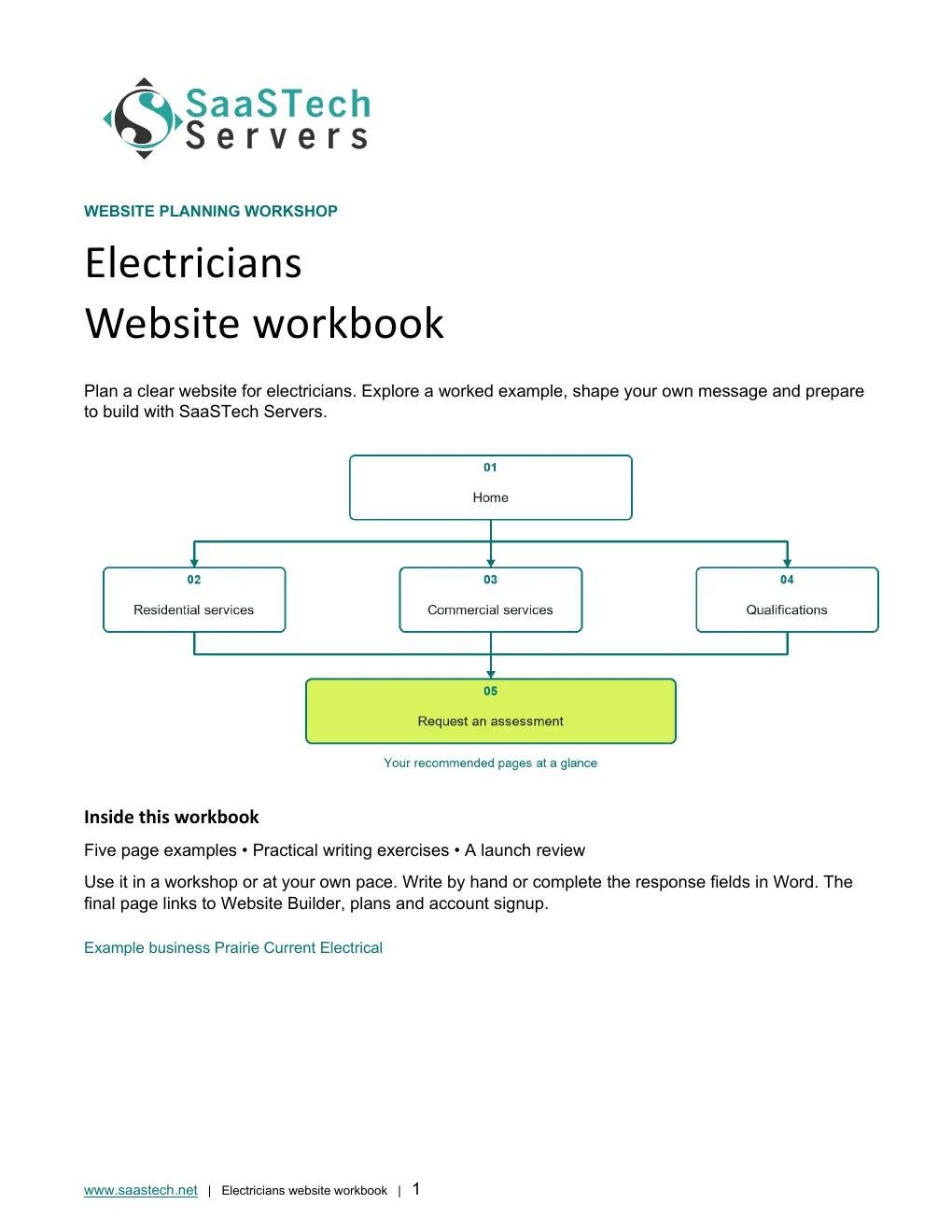
01 · HomeIdentify the customer types served, geographic area, and primary assessment action. Privacy-cropped excerpt; browser/editor chrome removed.02 · Residential servicesExplain repairs, panels, lighting, renovations, EV charging, and other offered work. Privacy-cropped excerpt; browser/editor chrome removed.03 · Commercial servicesDescribe project capacity, maintenance work, and how commercial enquiries are assessed. Privacy-cropped excerpt; browser/editor chrome removed.04 · QualificationsPublish verifiable licensing, insurance, safety training, and relevant experience. Privacy-cropped excerpt; browser/editor chrome removed.05 · Request an assessmentCollect property type, location, project description, timing, and contact details. Privacy-cropped excerpt; browser/editor chrome removed.
Compare plans
Choose your Website Builder plan.
Compare current Canadian starting prices and popular features. Final promotions, taxes, currency, eligibility and terms are confirmed in the secure shop.
Suggested for Electricians: Business Plus. Appointment tools suit assessments and consultations, while dedicated service pages help customers distinguish repairs, upgrades, and project work.
Best for Starter sites
Personal
C$8.99 / month
Professionally designed themes
Hosting, SSL and blog
Best for Business presence
Business
C$13.99 / month
Everything in Personal
PayPal and SEO
Suggested for this industryBest for Service businesses
Business Plus
C$20.99 / month
Social integration
Online appointments
Best for Selling online
Online Store
C$36.99 / month
Shopping cart and payments
Shipping and inventory
See what you can build
See the Website Builder tools behind the electrical site.
These real editor screens show how Prairie Current organizes service pages, adds practical content sections, and coordinates the approved Bisque theme with its navy colour, industry hero, and complete logo.
First setup
From the business brief to the first draft.
These saved setup screens show the starting point before the finished electrical pages were refined.
Choose the business categoryStart with an electrical-services category to guide the first draft.Name the demonstration businessGive the draft its Prairie Current Electrical identity.Describe the site you needExplain the residential and commercial services, audience and enquiry goals.Review the first generated siteThe genuine first draft is a starting point: review its text, images and suggested sections before customization.
Editor highlights
Build and organize the electrical site.
See the real page controls, section library and theme settings used for Prairie Current.
Organize the electrical service pagesThe Website panel keeps residential, commercial, qualifications, and assessment pages together beside the live design.Add sections that fit the workFlexible layouts, contact forms, galleries, scheduling, video, and other sections can be added without rebuilding the page.Coordinate the theme and industry colourPrairie Current uses the approved Bisque theme, a deep navy palette, a matching hero, and the complete light logo.
See what you can build
Themes and Paint your site
Open the preview to explore the captured themes, logo variations and paint settings in the image viewer.
Selected colours
Compare the captured theme groups with the Prairie Current palette.
The historical capture set is preserved until the missing individual Retro and Trade previews can be recaptured accurately.
Modern, Kai, Libre and BisqueThe same electrical hero, content, logo and selected navy colour shown across the themes captured in this group.Libre, Bisque, Urban and ScriptThe same electrical hero, content, logo and selected navy colour shown across the themes captured in this group.Urban, Script, Spaces and BrightThe same electrical hero, content, logo and selected navy colour shown across the themes captured in this group.Mint, Slate, Luxe and DuskThe same electrical hero, content, logo and selected navy colour shown across the themes captured in this group.Luxe, Dusk, Dawn and ClarityThe same electrical hero, content, logo and selected navy colour shown across the themes captured in this group.Dawn, Clarity, Element and SidelineThe same electrical hero, content, logo and selected navy colour shown across the themes captured in this group.Highlight, Organic, Focus and CraftThe same electrical hero, content, logo and selected navy colour shown across the themes captured in this group.
Default styles
Compare the captured themes with their original styling.
The same content makes differences in colour, type, navigation and buttons easy to review without inventing the missing screens.
Modern, Kai, Libre and BisqueThe same Prairie Current content shown with the captured themes' original colour, typography, navigation and button treatments.Libre, Bisque, Urban and ScriptThe same Prairie Current content shown with the captured themes' original colour, typography, navigation and button treatments.Urban, Script, Spaces and BrightThe same Prairie Current content shown with the captured themes' original colour, typography, navigation and button treatments.Mint, Slate, Luxe and DuskThe same Prairie Current content shown with the captured themes' original colour, typography, navigation and button treatments.Luxe, Dusk, Dawn and ClarityThe same Prairie Current content shown with the captured themes' original colour, typography, navigation and button treatments.Dawn, Clarity, Element and SidelineThe same Prairie Current content shown with the captured themes' original colour, typography, navigation and button treatments.Highlight, Organic, Focus and CraftThe same Prairie Current content shown with the captured themes' original colour, typography, navigation and button treatments.
Paint your site
Explore seven settings from light to dark.
Follow the slider in order, with the dark logo on light backgrounds and the light logo on darker backgrounds. Open any image to see the complete desktop view and colour controls.
Paint position 1 of 7 · LightestA full desktop view of the home page and its Paint your site setting. Compare the backgrounds, accents and buttons as the palette moves from light to dark.Paint position 2 of 7 · Light with subtle contrastA full desktop view of the home page and its Paint your site setting. Compare the backgrounds, accents and buttons as the palette moves from light to dark.Paint position 3 of 7 · Light with colour accentsA full desktop view of the home page and its Paint your site setting. Compare the backgrounds, accents and buttons as the palette moves from light to dark.Paint position 4 of 7 · Colourful midpointA full desktop view of the home page and its Paint your site setting. Compare the backgrounds, accents and buttons as the palette moves from light to dark.Paint position 5 of 7 · Dark with colour accentsA full desktop view of the home page and its Paint your site setting. Compare the backgrounds, accents and buttons as the palette moves from light to dark.Paint position 6 of 7 · DarkerA full desktop view of the home page and its Paint your site setting. Compare the backgrounds, accents and buttons as the palette moves from light to dark.Paint position 7 of 7 · DarkestA full desktop view of the home page and its Paint your site setting. Compare the backgrounds, accents and buttons as the palette moves from light to dark.
Earn confidence
Proof customers can evaluate.
Verifiable licensing
Documented safety practices
Relevant completed-project examples
Clear emergency-service boundaries
Be discoverable
Help the right customer find you.
Use individual pages for services customers search for by name.
Describe completed projects without exposing private customer or site information.
Answer common planning questions without presenting remote advice as a diagnosis.
Find your domain
It all starts with a name.
Try a .ca, or leave out the ending and we’ll help you find one that fits. The live search confirms current availability and pricing.
Explore country-code and regional domain endings with dedicated SaaSTech help articles. Registration rules and availability vary by registry and are confirmed in the secure storefront. Select an ending to open its specific help article in a new tab.
Compare current Canadian starting prices and popular features. Final promotions, taxes, currency, eligibility and terms are confirmed in the secure shop.
Suggested for Electricians: Business Professional. The guide uses Office apps, business email, calendars and organized documents together. Choose a lighter plan for roles that only need email or browser-based tools; confirm the features and number of users needed before ordering.
Best for Professional email
Email Essentials
C$8.99 / month
10 GB mailbox
Sync and shared calendars
Best for Larger mailbox
Email Plus
C$9.99 / month
50 GB mailbox
Sync and shared calendars
Best for Cloud teamwork
Online Business Essentials
C$15.99 / month
Office web apps and 1 TB
Meetings plus 50 GB email
Suggested for this industryBest for Full Office apps
Business Professional
C$22.99 / month
Apps on up to 5 devices and 1 TB
Meetings plus 50 GB email
Grow intentionally
Advanced options when the business is ready.
These are selective next steps—not requirements for launching the website.
Download templates branded for Prairie Current Electrical. Complete the fields in Word or the input cells in Excel, or print the forms and planners for handwriting. Website workbooks also include a print-ready PDF. Adapt the example branding and details for your own business.
Site assessment checklistPrairie Current Electrical · Word document preview. Download the editable file below.
SaaSTech website planning workbook · Page 1SaaSTech Servers · Word document preview. Download the editable file below.
A website-planning guide in editable Word and print-ready PDF, with an example page plan, sample wording and space to draft your own content. Adapt the fictional example and confirm the details for your business.
SaaSTech example templates, not official Microsoft templates. Keep confidential records in your approved private systems. These files do not connect to Website Builder or submit information.
Put the services to work
Small systems that make a real business easier to choose.
These examples connect the technology to everyday customer and team needs in electricians.
01Domain
Carry one professional identity everywhere
Match the website and email domain on estimates, permits, vehicles, inspection documents, and project handoffs.
02Website
Explain the assessment before the visit
Show which repairs, upgrades, EV chargers, panels, and commercial projects are accepted and what information is needed first.
03Business email
Organize project communication
Use shared calendars and named mailboxes for estimates, scheduling, drawings, and follow-up without exposing personal addresses.
Before going live
Launch like a customer is already waiting.
Explore industries⌃AaDisplay
Text size
Appearance
Get Your Electricians Business Online | SaaSTech Servers