Help buyers and sellers understand their next step before they enquire.
For independent real-estate agents, residential property teams, and brokerages
A useful real-estate website combines clear buyer and seller guidance, accurate property information, and a recognizable agent identity. Make it easy to ask a focused question without confusing illustrative images with active listings.
Use the matching Real Estate Agents workbook to shape your pages, and watch the contact video if you would like help from SaaSTech.
SAASTECH SUPPORT VIDEO
How to contact SaaSTech Servers
Need help choosing your next step? This short video explains how to contact SaaSTech Servers. Use the page plan and downloadable guide below to plan your website.
A website-planning guide in editable Word and print-ready PDF, with an example page plan, sample wording and space to draft your own content. Adapt the fictional example and confirm the details for your business.
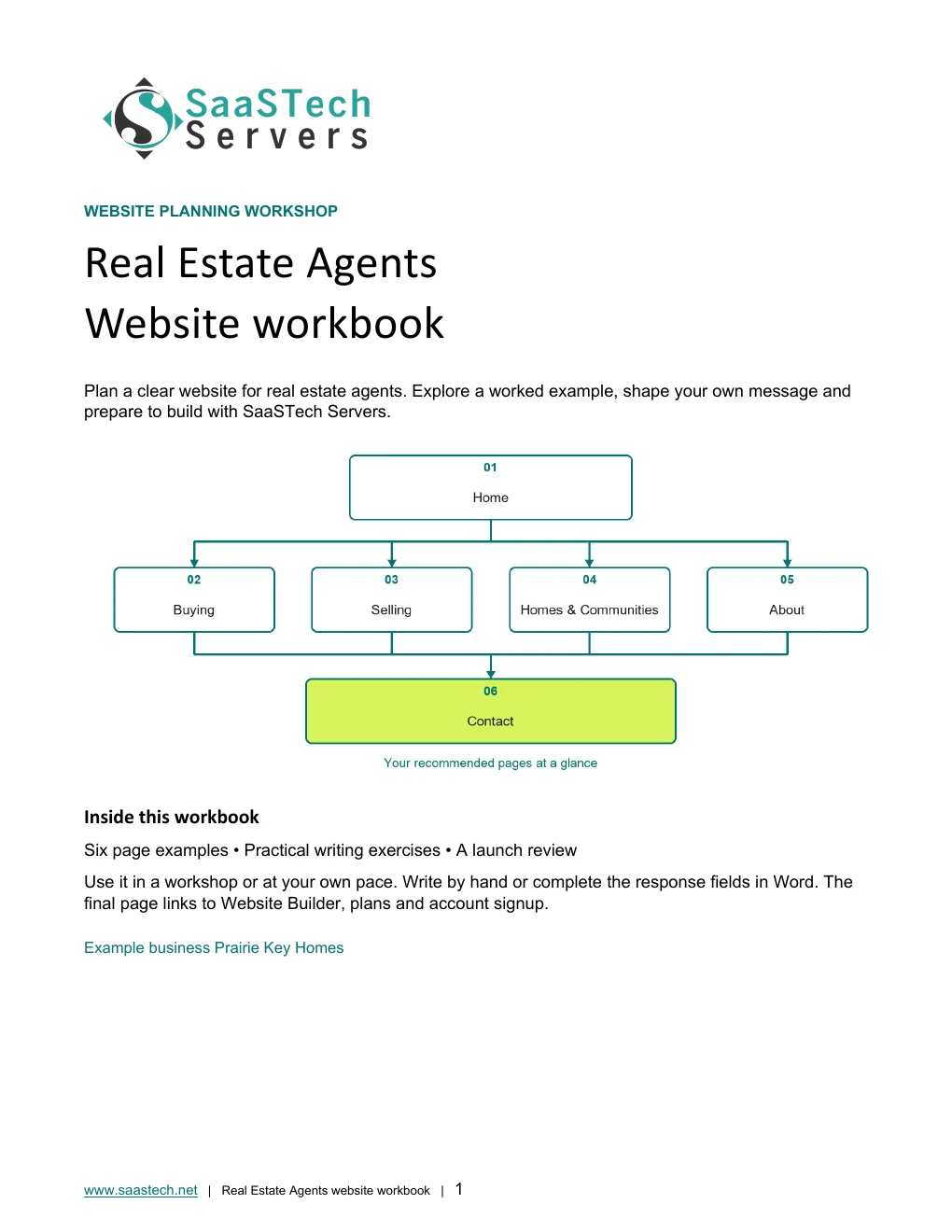
Start with this compact structure and add pages only when they answer a distinct visitor question.
01 · HomeIntroduce the agent, actual service area and a clear buyer or seller conversation path. Use an approved cover image and distinguish examples from available properties. Privacy-cropped excerpt; browser/editor chrome removed.02 · BuyingHelp visitors organize priorities, prepare viewing questions and understand the next conversation without replacing professional financial or legal advice. Privacy-cropped excerpt; browser/editor chrome removed.03 · SellingExplain preparation, photography, marketing planning and communication without guaranteeing a price or sale date. Privacy-cropped excerpt; browser/editor chrome removed.04 · Homes & CommunitiesPresent current authorized property information and objective local amenities. Label illustrative photography clearly; do not imply a live listings feed unless one is connected and tested. Privacy-cropped excerpt; browser/editor chrome removed.05 · AboutUse verified agent and brokerage identities, approved photographs, relevant experience and a clear service approach. Do not invent awards, credentials or reviews. Privacy-cropped excerpt; browser/editor chrome removed.06 · ContactAsk for name, contact method, buying or selling interest, community and approximate timing. Keep identity documents and financial records out of a general enquiry form, and explain that requests are not confirmed appointments. Privacy-cropped excerpt; browser/editor chrome removed.
Compare plans
Choose your Website Builder plan.
Compare current Canadian starting prices and popular features. Final promotions, taxes, currency, eligibility and terms are confirmed in the secure shop.
Suggested for Real Estate Agents: Business. Start with public information pages, agent introductions and enquiry guidance. Compare current plan inclusions before purchase. Appointment scheduling or listing feeds should be added only after checking the actual workflow, provider requirements and any additional costs; a template is not a working property feed.
Best for Starter sites
Personal
C$8.99 / month
Professionally designed themes
Hosting, SSL and blog
Suggested for this industryBest for Business presence
Business
C$13.99 / month
Everything in Personal
PayPal and SEO
Best for Service businesses
Business Plus
C$20.99 / month
Social integration
Online appointments
Best for Selling online
Online Store
C$36.99 / month
Shopping cart and payments
Shipping and inventory
See what you can build
Explore the editor themes behind the Real Estate Agents site.
Prairie Key Homes follows the six-page structure above. Its Home button, “Plan a first conversation,” leads to Contact. The cover and navy-and-copper logo carry the same identity as this guide.
First setup
Start with the right brief.
Choose Real Estate AgentStart with the category that matches the business, then refine the generated pages.Name the examplePrairie Key Homes is the fictional identity used throughout this guide and demo.Give the builder a focused briefRequest Home, Buying, Selling, Homes & Communities, About, and Contact. Explain that photos are illustrative, not active listings.Review the first draftThis is the original generated starting point, before the Prairie Key cover, logo, copy and supporting photos were applied. Privacy-cropped excerpt; browser/editor chrome removed.
Watch the first site take shape
The builder turns your business brief into a first draft. For a real estate website, start with clear buyer and seller journeys, then review the pages, add your branding and choose images that support each message.
Creating the first draftIllustrative setup capture from the Prairie Passage Travel demo; the same building stage applies to other industries.
Editor highlights
Build around the first conversation.
The suggested Business plan is a starting point for this information-led site. Match the plan to your actual needs and check current plan inclusions. These editor examples demonstrate navigation, page links and image presentation—not a listings feed or confirmed booking system.
Navigation · Give each page a purposeUse six focused pages to separate buying, selling, community information and the contact process. The demo deliberately does not accept enquiries. Privacy-cropped excerpt; browser/editor chrome removed.Action button · Connect the next stepPlan a first conversation links to the Contact information page. A real business should configure and test its approved enquiry route before enabling submissions. Privacy-cropped excerpt; browser/editor chrome removed.Image tools · Choose a useful crop and descriptionCompare cover layouts and explain what the photo shows. The fictional agent matches this industry guide; supporting photos have different jobs on each page. Privacy-cropped excerpt; browser/editor chrome removed.
See what you can build
Themes and Paint your site
Open the preview to explore the captured themes, logo variations and paint settings in the image viewer.
New themes
Explore 27 new designs.
Seven desktop captures cover every new design in the upgraded viewer. Some templates introduce stock imagery, animation or different colours; review these before applying a theme.
1 / 7
Aurora, Sorbet, Muse and FolioIntact desktop theme-viewer capture with the actual navy-and-copper logo. Template overlays and animated stock imagery belong to the design previews, not the finished demo.
More themes
Compare 22 additional layouts.
The upgraded builder now groups its catalogue as New themes and More themes, rather than the earlier chosen-colour/default-style galleries. Urban remains the finished demo theme.
1 / 6
Modern, Kai, Libre and BisqueIntact desktop theme-viewer capture with the actual navy-and-copper logo. Template overlays and animated stock imagery belong to the design previews, not the finished demo.
Paint your site
Move from light to dark.
All seven positions are shown in order with the full desktop settings panel. The colour logo has its original white backing for contrast; no logos were pasted over the screenshots.
Paint position 1 of 7 · LightThe same Home page with a different paint setting. Compare the header, hero panel and section backgrounds.Paint position 2 of 7The same Home page with a different paint setting. Compare the header, hero panel and section backgrounds.Paint position 3 of 7The same Home page with a different paint setting. Compare the header, hero panel and section backgrounds.Paint position 4 of 7 · Colourful midpointThe same Home page with a different paint setting. Compare the header, hero panel and section backgrounds.Paint position 5 of 7The same Home page with a different paint setting. Compare the header, hero panel and section backgrounds.Paint position 6 of 7The same Home page with a different paint setting. Compare the header, hero panel and section backgrounds.Paint position 7 of 7 · DarkThe same Home page with a different paint setting. Compare the header, hero panel and section backgrounds.
Earn confidence
Proof customers can evaluate.
Verified agent and brokerage information
Accurate property status and sources
Approved photography and clearly labelled examples
Clear response and appointment expectations
Be discoverable
Help the right customer find you.
Create useful buyer and seller pages for the areas actually served.
Describe objective amenities and property features, with sources and review dates where appropriate.
Keep agent details and listing status consistent across the website and approved external channels.
Find your domain
It all starts with a name.
Try a .ca, or leave out the ending and we’ll help you find one that fits. The live search confirms current availability and pricing.
Explore country-code and regional domain endings with dedicated SaaSTech help articles. Registration rules and availability vary by registry and are confirmed in the secure storefront. Select an ending to open its specific help article in a new tab.
Compare current Canadian starting prices and popular features. Final promotions, taxes, currency, eligibility and terms are confirmed in the secure shop.
Suggested for Real Estate Agents: Business Professional. The guide uses Office apps, business email, calendars and organized documents together. Choose a lighter plan for roles that only need email or browser-based tools; confirm the features and number of users needed before ordering.
Best for Professional email
Email Essentials
C$8.99 / month
10 GB mailbox
Sync and shared calendars
Best for Larger mailbox
Email Plus
C$9.99 / month
50 GB mailbox
Sync and shared calendars
Best for Cloud teamwork
Online Business Essentials
C$15.99 / month
Office web apps and 1 TB
Meetings plus 50 GB email
Suggested for this industryBest for Full Office apps
Business Professional
C$22.99 / month
Apps on up to 5 devices and 1 TB
Meetings plus 50 GB email
Grow intentionally
Advanced options when the business is ready.
These are selective next steps—not requirements for launching the website.
Download templates branded for Prairie Key Homes. Complete the fields in Word or the input cells in Excel, or print the forms and planners for handwriting. Website workbooks also include a print-ready PDF. Adapt the example branding and details for your own business.
Buyer priorities and viewing checklistPrairie Key Homes · Word document preview. Download the editable file below.
SaaSTech website planning workbook · Page 1SaaSTech Servers · Word document preview. Download the editable file below.
A website-planning guide in editable Word and print-ready PDF, with an example page plan, sample wording and space to draft your own content. Adapt the fictional example and confirm the details for your business.
SaaSTech example templates, not official Microsoft templates. Keep confidential records in your approved private systems. These files do not connect to Website Builder or submit information.
Put the services to work
Small systems that make a real business easier to choose.
These examples connect the technology to everyday customer and team needs in real estate agents.
01Website Builder
Make the next step clear
Separate buyer and seller guidance, then link each journey to the approved enquiry route. Keep illustrative photos clearly separate from current property listings.
02Domain and email
Keep one recognizable identity
Use a business-owned domain and branded email that match verified agent and brokerage details. Make ownership and renewal responsibilities clear.
03Microsoft 365
Organize the preparation
Create a viewing checklist and marketing schedule for the team. Keep identity documents and confidential transaction records out of general website forms.
Before going live
Launch like a customer is already waiting.
Explore industries⌃AaDisplay
Text size
Appearance
Get Your Real Estate Agents Business Online | SaaSTech Servers